
Understanding Magic Properties
A look at a common SPARQL pattern


SPARQL can seem more than a little mystifying even for people who have worked with it for some time. It is possible (and indeed, typical) to create “standard” functions that extend the core function set defined in the W3C SPARQL standard, but this can get complicated when gets returned has more than one parametric output or requires more than one input (especially when that input is an array or something similar). One solution to this particular dilemma is to introduce magical properties.
Ordinarily, when you write a SPARQL query, you typically look for a pattern in the triple store itself. For instance, suppose that you want to retrieve the names of all people who are members of a particular People class. This query might look something like:
prefix rdfs: <http://www.w3.org/2000/01/rdf-schema#>
prefix xs: <http://www.w3.org/2001/XMLSchema#>
prefix Class: <http://www.example.com/ns/Class#>
prefix Person: <http://www.example.com/ns/Person#>
prefix ex: <http://www.example.com/ns#>

select ?person ?name where {
    ?person a Class:Person .
    ?person rdfs:label ?name .
    }
where Class:Person is a CURIE of the particular class (an abbreviated form of the IRI
<http://www.example.com/ns/Class#Person> For now, we’ll not dig too deep into how you identify a given class - this is a function of the respective ontology - and instead just note that once the first line finds a match in the SPARQL query for ?person, then this same variable is then used with the second statement. That is to say, if you have the Turtle statements:
Person:JaneDoe a Class:Person .
Person:JaneDoe rdfs:label "Jane Doe"^^xs:string .
in the dataset, then one value for ?person will be Person:JaneDoe (which is the same as <http://www.example.com/ns/Person#JaneDoe>) and the corresponding value for ?name will be “Jane Doe”^^xs:string .
Normally, when a SPARQL file is processed, each line is converted into a match pattern against the triple store. However, in some cases, a preprocessor can be written that will specifically look for a particular predicate, then will attempt to fill the variable names on either side of the predicate with the results of a function call. Typically, the subject contains the parameter information, the predicate identifies the function, and the object then contains a variable (or set of variables in a list) that is assigned as the result of the magic property.
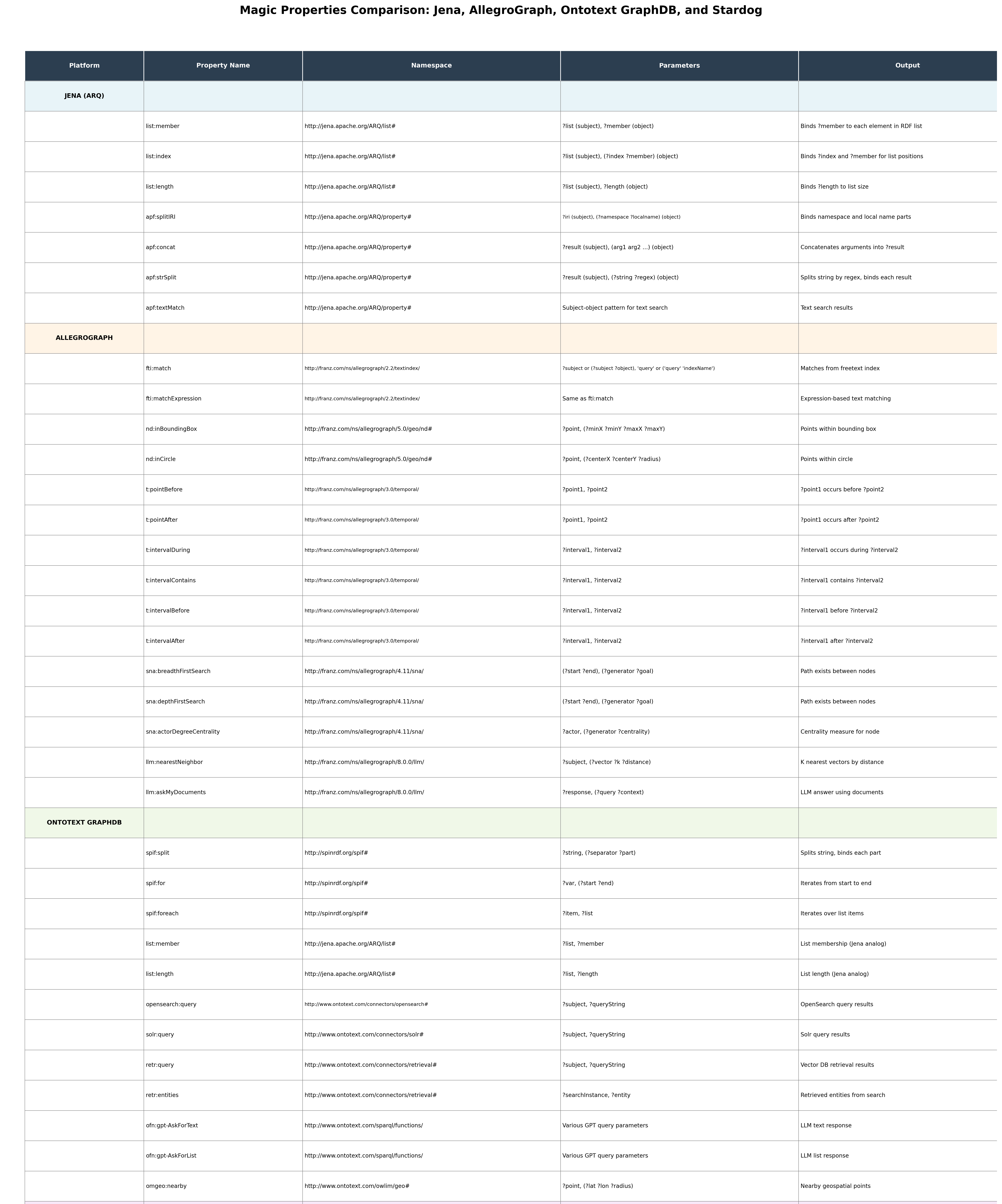
For instance, the following table provides a partial list of the magic properties used by Jena, Allegrograph, Ontotext (recently renamed Graphwise), and Startdog:
For instance, if you’re running Jena, consider the case where you have a pointer to a linked list in RDF:
ex:ColorSet_RainbowColors rdf:value ("red" "orange" "yellow" "green" "cyan" "blue" "purple") .This is a pattern that occurs quite often in RDF, where the object here is an RDF List, a blank node that has the properties rdf:first and rdf:rest, with the rdf:first property pointing to the first item in the list, and the rdf:rest pointing to another blank node that has the next item in the list. Such lists can be traversed via SPARQL, but they are awkward to work with, especially if you are trying to do things like retrieve a certain item from a list or get a count of items.
Jena and GraphDB both get around this with a set of magic properties in the list: namespace (http://jena.apache.org/ARQ/list#). For instance, list:length can be used to determine how many items are in a list in SPARQL:
#SPARQL
prefix rdfs: <http://www.w3.org/2000/01/rdf-schema#>
prefix xs: <http://www.w3.org/2001/XMLSchema#>
prefix ex: <http://www.example.com/ns#>

SELECT ?list ?length where {
    values ?list {ex:ColorList_RainbowColors}
    ?list list:length ?length
}
In this particular case, the list:length predicate does not indicate a match in the RDF, but rather invokes a function that takes a pointer to a linked list structure (here derived via the rdf:value predicate) and puts the resulting count of items into the variable ?length.
Similarly, you can iterate over the items of the list with the list:index magic property:
#SPARQL
prefix rdfs: <http://www.w3.org/2000/01/rdf-schema#>
prefix xs: <http://www.w3.org/2001/XMLSchema#>
prefix ex: <http://www.example.com/ns#>

SELECT ?index ?color where {
    values ?list {ex:ColorList_RainbowColors}
    ?list list:index (?index ?color)
}
This produces the table:
| index | color        |
|-------|--------------|
| 0     | "red"        |
| 1     | "orange"     |
| 2     | "yellow"     |
| 3     | "green"      |
| 4     | "cyan"       |
| 5     | "blue"       |
| 6     | "purple"     |
You can similarly use this to retrieve a particular value by index, such as the 4th item (with index = 3, since this is zero-based):
#SPARQL
prefix rdfs: <http://www.w3.org/2000/01/rdf-schema#>
prefix xs: <http://www.w3.org/2001/XMLSchema#>
prefix ex: <http://www.example.com/ns#>

SELECT ?color where {
    values ?list {ex:ColorList_RainbowColors}
    ?pointerToList rdf:value ?list .
    ?list list:index (3 ?color)
}
which will return a table with the single colour “green”.
In both examples, the object is itself a list (holding two values), which makes it possible to pass multiple outputs via the magic property mechanism.
Splits and Concats
You can also do concatenations and splits, which illustrates that magic properties do not necessarily need to go from left to right. For instance, you can tokenise content by splitting on a regex pattern. If you have the following Turtle:
@prefix : <http://example.org/> .
@prefix rdf: <http://www.w3.org/1999/02/22-rdf-syntax-ns#> .

# People with comma-separated skills
:alice :name “Alice Smith” ;
       :skillsText “SPARQL, RDF, OWL, SHACL, Python” ;
       :email “alice.smith@example.com” .

:bob :name “Bob Johnson” ;
     :skillsText “Java, JavaScript, React, Node.js” ;
     :tags “developer|architect|consultant” .

:charlie :name “Charlie Brown” ;
         :fullPath “/home/users/charlie/documents/report.txt” ;
         :csvData “2023,Q1,150000,North” .

# Products with pipe-delimited categories
:product1 :productName “Laptop Pro” ;
          :categories “Electronics|Computers|Business” .

:product2 :productName “Office Chair” ;
          :categories “Furniture|Office|Ergonomic” .

# Document with semicolon-separated tags
:doc1 :title “Semantic Web Tutorial” ;
      :keywords “RDF;SPARQL;Ontology;Knowledge Graph;Linked Data” .
Then you can use things like spif:split in GraphDB (Jena and Allegrograph have similar magic properties) in order to break lists apart:
PREFIX spif: <http://spinrdf.org/spif#>
PREFIX : <http://example.org/>

SELECT ?person ?name ?skill
WHERE {
  ?person :name ?name ;
          :skillsText ?skillsText .

  # Split the comma-separated skills
  ?skillsText spif:split ("," ?skill) .
}
ORDER BY ?person ?skill
This produces a table like the following:
| person   | name          | skill      |
|----------|---------------|------------|
| :alice   | "Alice Smith" | "SPARQL"   |
| :alice   | "Alice Smith" | "RDF"     |
| :alice   | "Alice Smith" | "OWL"     |
| :alice   | "Alice Smith" | "SHACL"   |
| :alice   | "Alice Smith" | "Python"  |
| :bob     | "Bob Johnson" | "Java"     |
| :bob     | "Bob Johnson" | "JavaScript" |
| :bob     | "Bob Johnson" | "React"   |
| :bob     | "Bob Johnson" | "Node.js" |
In this case, the delimiter (separator) is passed on the object side as part of a list of parameters, while the ?skill is unbound.
Note that this can also be a useful mechanism for mapping strings to objects:
PREFIX spif: <http://spinrdf.org/spif#>
PREFIX : <http://example.org/>

CONSTRUCT {?person :skill ?skillIRI}
WHERE {
  ?person :name ?name ;
          :skillsText ?skillsText .

  # Split the comma-separated skills
  ?skillsText spif:split (”,” ?skill) .
  ?skillIRI rdfs:label ?skill .
}
This produces the graph:
:alice :skill :sparql, :rdf, :owl, :shacl, :python .
:bob :skill :java, :javascript, :react, :nodejs .
This produces a similar table, assuming a one-to-one match between the string value of each item in the origin skillsText and the rdfs:label of each skill in the database. Otherwise, you can use filters, synonyms, and existing SPARQL functions to do the matching.
The concat() function can be used to concatenate a sequence of strings, but concatenating an arbitrary list is more complex. The apf:concat magic property can concatenate a list, but doesn’t provide a delimiter:
PREFIX apf: <http://jena.apache.org/ARQ/property#>
PREFIX foaf: <http://xmlns.com/foaf/0.1/>
PREFIX : <http://example.org/>

SELECT ?person ?name ?skillsText
WHERE {
  ?person foaf:name ?name ;
          :skillsList ?skillsList .

  # Concatenate all skills from the list (no separator)
  ?skillsText apf:concat (?skillsList) .
}
Output:
| person  | name          | skillsText                      |
|---------|---------------|---------------------------------|
| :alice  | “Alice Smith” | “SPARQLRDFOWLSHACLPython”       |
In this case, it’s better to use the group_concat function:
PREFIX list: <http://jena.apache.org/ARQ/list#>
PREFIX foaf: <http://xmlns.com/foaf/0.1/>
PREFIX : <http://example.org/>

SELECT ?person ?name ?skillsText
WHERE {
  ?person foaf:name ?name ;
          :skillsList ?skillsList .

  # Use list:member to iterate and GROUP_CONCAT to join
  {
    SELECT ?person (GROUP_CONCAT(?skill; separator=”, “) AS ?skillsText)
    WHERE {
      ?person :skillsList ?skillsList .
      ?skillsList list:member ?skill .
    }
    GROUP BY ?person
  }
}
This produces the output:
| person  | name          | skillsText                          |
|---------|---------------|-------------------------------------|
| :alice  | “Alice Smith” | “SPARQL, RDF, OWL, SHACL, Python”   |
Note that list:member is another magic property that retrieves each item from a list individually. This example also illustrates the use of a subquery, which uses the GROUP BY keyword and the GROUP_CONCAT function to give you a controllable concatenation with comma and space-separated delimiters.
Issues With Magic Properties
While magic properties are useful, they are also very much platform-specific (i.e., hacks). Jena and GraphDB share a number (but not all) of the Jena ARQ functions. Stardog and MarkLogic each use a more functional approach, defining functions externally (MarkLogic uses the xdmp:apply function, which I’ll cover in a different article.
This lack of consistency means you should use them only if you know you’ll be on a specific platform. Allegrograph, for instance, does support magic properties, but doesn’t support the full ARQ set that Jena uses. On the other hand, they use the sna (social network) namespace functions to perform many of the same kinds of operations.
There are also some questions about whether or not such magic properties will be used as a pattern moving forward. SHACL offers an alternative, but this is still in the discussion stages, so I’ll defer going into depth in this article.
Magic Properties and LLMs
Similarly, both Allegrograph and GraphDB can query LLMs, though they do so in different ways:
# Allegrograph SPARQL

PREFIX llm: <http://franz.com/ns/allegrograph/8.0.0/llm/>
PREFIX : <http://example.org/>

# Ask the LLM a question about data in your knowledge graph
SELECT ?response
WHERE {
  # Get some context from your knowledge graph
  :person1 :name ?name ;
           :expertise ?expertise ;
           :yearsExperience ?years .

  # Build a query for the LLM
  BIND(CONCAT("Based on this person’s profile: Name=",
              STR(?name),
              ", Expertise=",
              STR(?expertise),
              ", Years=",
              STR(?years),
              ". Should we hire them for a senior role?") AS ?query)

  # Ask the LLM using askMyDocuments
  ?response llm:askMyDocuments (?query ?contextGraph) .
}
# GraphDB SPARQL
PREFIX ofn: <http://www.ontotext.com/sparql/functions/>
PREFIX : <http://example.org/>
# Ask GPT a question about data in your knowledge graph
SELECT ?name ?expertise ?years ?gptResponse
WHERE {
# Get context from knowledge graph
:person1 :name ?name ;
:expertise ?expertise ;
:yearsExperience ?years .
# Build the prompt
BIND(CONCAT("Based on this person’s profile: Name=",
STR(?name),
", Expertise=",
STR(?expertise),
", Years=",
STR(?years),
". Should we hire them for a senior role?") AS ?prompt)
# Use the magic predicate to query GPT
?prompt ofn:gpt-AskForText (?gptResponse) .
}Note that in both cases, you need to configure the connections within the respective databases first:
AllegroGraph Configuration
Before using LLM magic properties in AllegroGraph, you need to configure:
API Key: Set your OpenAI API key
Model Selection: Choose which GPT model to use
Embedding Model: For vector operations
Configuration is typically done via Lisp:
;; Lisp configuration
(setf (llm-config)
  ‘(:api-key “your-openai-key”
    :model “gpt-4”
    :embedding-model “text-embedding-ada-002”))
GraphDB Configuration
GraphDB requires configuration in the repository settings:
Navigate to Setup → Repositories → [Your Repository] → Connectors
Configure OpenAI/GPT Settings:
API Key
Model selection (gpt-4, gpt-3.5-turbo, etc.)
Temperature and other parameters
Enable the GPT functions
Or configure via properties:
properties
openai.api.key=your-api-key-here
openai.model=gpt-4
openai.temperature=0.7
Summary
Magic properties provide one way to extend SPARQL to handle common use cases, though the danger is that they can increase vendor lock-in and are often unstable, as they represent experimental features. However, knowing that such capabilities exist can significantly enhance the power of your queries (and updates). A similar set of capabilities comes with the SERVICES infrastructure in SPARQL, another topic for an upcoming post.
In Media Res,

Check out my LinkedIn newsletter, The Cagle Report.
I am also currently seeking new projects or work opportunities. If anyone is looking for a CTO or Director-level AI/Ontologist, please contact me through my Calendly:
If you want to shoot the breeze or have a cup of virtual coffee, I have a Calendly account at https://calendly.com/theCagleReport. I am available for consulting and full-time work as an ontologist, AI/Knowledge Graph guru, and coffee maker. Also, for those of you whom I have promised follow-up material, it’s coming; I’ve been dealing with health issues of late.
I’ve created a Ko-fi account for voluntary contributions, either one-time or ongoing, or you can subscribe directly to The Ontologist. If you find value in my articles, technical pieces, or general thoughts about work in the 21st century, please consider contributing to support my work and allow me to continue writing.
You had me at "Magical Properties..."
The rest was just a (classy) act.
Pardon my ignorance, but what is the RDF term "ex:ColorSet/RainbowColors"? My version of Jena (5.6) rejects it.