
SHACL for User Interfaces
Abstracting the UI


In my previous article (Validating Anything with SHACL), I discussed validation in general and SHACL’s use as a language for validating RDF. However, even if you are not using validation per se, there are a number of things that you can do with SHACL definitions that make the language extraordinarily powerful. One of the more powerful is the use of SHACL to help shape user interfaces, which is the focus of this blog post.
Order and Grouping
RDF by itself has a couple of different ways of specifying groupings - rdf:N, where N is a non-negative integer and is a subproperty of rdf:member, and linked lists. However, these don’t necessarily translate into being able to specify the order of a set of properties, which are often significant.
Two of my more favorite SHACL properties are sh:order and sh:group. The sh:order property lets you assign a ranking to a particular shacl shape. For instance, take a simple address:
PREFIX ex: <http://example.com/ns#>
PREFIX sh: <http://www.w3.org/ns/shacl#>

ex:Address_NodeShape a sh:NodeShape ;
    sh:targetClass ex:Address ;
    sh:property
         ex:Address_city_PropertyShape,
         ex:Address_country_PropertyShape,
         ex:Address_postalCode_PropertyShape,
         ex:Address_stateOrProvince_PropertyShape,
         ex:Address_street_PropertyShape ;
   .

ex:Address_city_PropertyShape a sh:PropertyShape ;
   sh:path ex:city ;
   .

ex:Address_country_PropertyShape a sh:PropertyShape ;
   sh:path ex:country ;
   .

ex:Address_postalCode_PropertyShape a sh:PropertyShape ;
   sh:path ex:postalCode ;
   .

ex:Address_stateOrProvince_PropertyShape a sh:PropertyShape ;
   sh:path ex:stateOrProvince ;
   .

ex:Address_street_PropertyShape a sh:PropertyShape ;
   sh:path ex:street ;
   .
This is about as minimal a structure that you can get in SHACL, but it should be noted that the ordering here is alphabetical, but not the order you’d normally expect the content to be (in whatever country’s native ordering is, which can vary dramatically).
We can also create a sample address record in Turtle:
# Prefixes
@prefix ex: <http://example.org/> .
@prefix sh: <http://www.w3.org/ns/shacl#> .
@prefix rdfs: <http://www.w3.org/2000/01/rdf-schema#> .
@prefix xsd: <http://www.w3.org/2001/XMLSchema#> .

# RDF Data - Address Instances
ex:Address1 a ex:Address ;
    ex:city ex:NewYorkCityNY ;
    ex:country ex:UnitedStates ;
    ex:postalCode "10119"^^xsd:string ;
    ex:stateOrProvince ex:USA_NY ;
    ex:street "123 Sesame Street"^^xsd:string .

ex:Address2 a ex:Address ;
    ex:city ex:Arkham ;
    ex:country ex:UnitedStates ;
    ex:postalCode "11235"^^xsd:string ;
    ex:stateOrProvince ex:USA_MA ;
    ex:street "1313 Mockingbird Lane"^^xsd:string .
Keep in mind that there is no explicit order here (it’s implicitly in alphabetical order, but that’s only because that’s the order that I wrote it).
Let’s say, however, that I wanted a list of properties for a given class in a distinct order. This is where you can add to the SHACL file, as follows:
#namespaces as above
ex:Address_NodeShape a sh:NodeShape ;
    sh:targetClass ex:Address ;
    sh:group ex:Address_Group ;
    sh:property
         ex:Address_city_PropertyShape,
         ex:Address_country_PropertyShape,
         ex:Address_postalCode_PropertyShape,
         ex:Address_stateOrProvince_PropertyShape,
         ex:Address_street_PropertyShape .

# SHACL Schema - Property Group
ex:Address_Group a sh:PropertyGroup ;
    rdfs:label "Address"@en ;
    sh:order 2 .

# SHACL Schema - Property Shapes
ex:Address_street_PropertyShape a sh:PropertyShape ;
    sh:path ex:street ;
    rdfs:label "Street"@en ;
    sh:name "street"^^xsd:string ;
    sh:order 1 .

ex:Address_city_PropertyShape a sh:PropertyShape ;
    sh:path ex:city ;
    rdfs:label "City"@en ;
    sh:name "city"^^xsd:string ;
    sh:order 2 .

ex:Address_stateOrProvince_PropertyShape a sh:PropertyShape ;
    sh:path ex:stateOrProvince ;
    rdfs:label "State or Province"@en ;
    sh:name "stateOrProvince"^^xsd:string ;
    sh:order 3 .

ex:Address_postalCode_PropertyShape a sh:PropertyShape ;
    sh:path ex:postalCode ;
    rdfs:label "Postal Code"@en ;
    sh:name "postalCode"^^xsd:string ;
    sh:order 4 .

ex:Address_country_PropertyShape a sh:PropertyShape ;
    sh:path ex:country ;
    rdfs:label "Country"@en ;
    sh:name "country"^^xsd:string ;
    sh:order 5 .
Here I added three properties: a label (rdf:label) for identifying the name of the property or class in question, the order (sh:order) that indicates the index of the item, and a group (sh:group) that indicates the name of a group that determines what array is being indexed (here ex:Address_Group).
This can be used with a simple SPARQL SELECT statement to develop a table with properties ordered in the way that one would expect, given the sh:order statement:
# SPARQL
# namespaces as above

SELECT
       ?node
       (?classLabel as ?Class)
       (?propertyLabel as ?Property)
       (?propertyName as ?Name)
       (?value as ?Value)
WHERE {
# Set the initial class to ex:Address
   bind(?class as ex:Address)
# Retrieve all nodes that are a member of this class
   ?node a ?class .
# Retrieve the associated class shape for this class
   ?classShape sh:targetClass ?class .
# For this class shape, get it's shacl group
   ?classShape sh:group ?group .
# For this group, get the order of that group
   ?groupOrder sh:order ?groupOrder .
# Get the label for the group (which will typically be the class name)
   ?group rdfs:label ?classLabel .
# Get all property shapes from the class shape
   ?classShape sh:property ?propertyShape .
# Get the path from the property shape
   ?propertyShape sh:path ?path .
# Get the property order from the property shape
   ?propertyShape sh:order ?order .
# Get the programmatic name from the property shape
   ?propertyShape sh:name ?propertyName .
# From the property path, retrieve the value(s) for the given property
   ?node ?path ?value .
   }
#order by group order, then individual order
order by ?groupOrder ?order
The output of this can be rendered as a table:
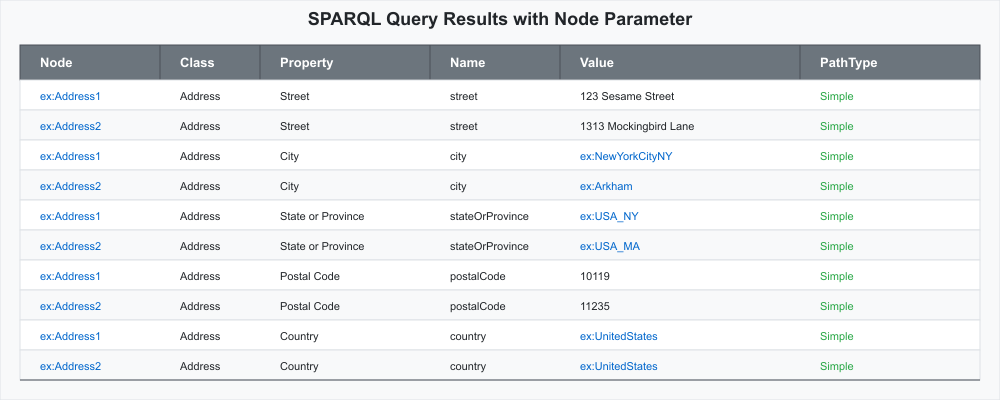
The Name property may be used by a JavaScript or Python script to give a “standard” name to the RDF IRI, for instance.
It is worth noting that this script ONLY works if sh:path is a single-item predicate. Contact me at kurt.cagle@gmail.com is you have questions about handling complex predicate paths.
You may notice in the SHACL file that the SHACL Address Property Group:
ex:Address_Group a sh:PropertyGroup ;
    rdfs:label "Address"@en ;
    sh:order 2 .
has an order of 2. The order is just used for sorting purposes. This could even be extended as:
ex:Address_Group a sh:PropertyGroup ;
    rdfs:label "Address"@en ;
    sh:order 2 ;
    sh:group ex:Person_Group ;
     .
If you had a complex SHACL structure representing Person, which had a corresponding ex:address property, then this would appear second in the above listing (usually under something like ex:PersonName ). This can facilitate production of extensive reports and forms.
Cardinality information and data type information (such as whether a given literal is a string, number or date/time) can be passed in much the same way, as can annotation such as property descriptions. The sh:description property is especially useful for this and would be added to the property shapes to hold this metadata, and to the property group for header tooltips or summaries).
Dash Widgets
SHACL was formalized as a standard in 2017. Over time, a second emergent standard - the W3C Data Shapes standard, more informally known as DASH, has been evolving to handle frequently needed extensions to the SHACL language. One of the more intriguing of these are Dash Widgets, as laid out in Form Generation using SHACL and DASH. They are, as might be expected, ways of identifying how a particular property may get displayed, and is broken into two sections: Editor components and Viewer components, corresponding to read-write and read-only components.
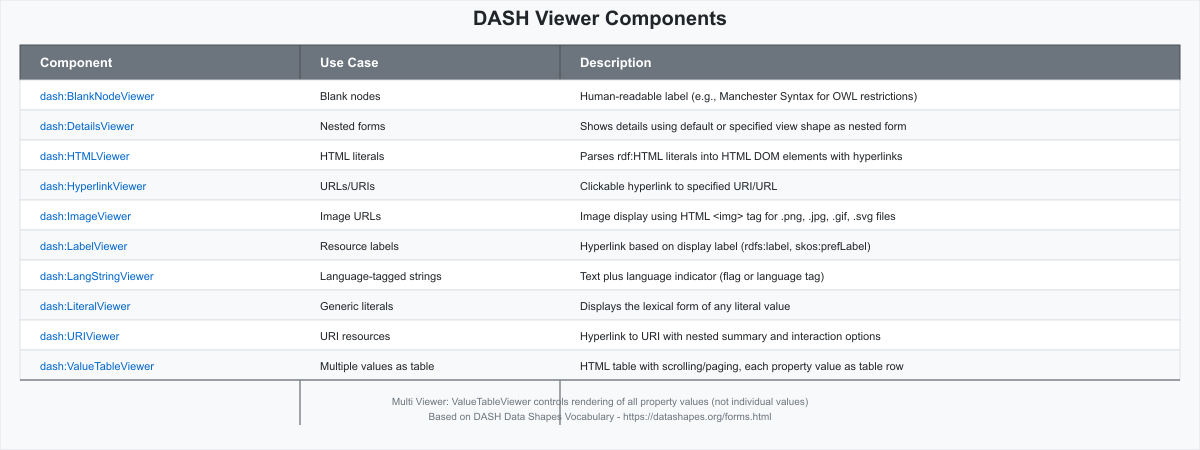
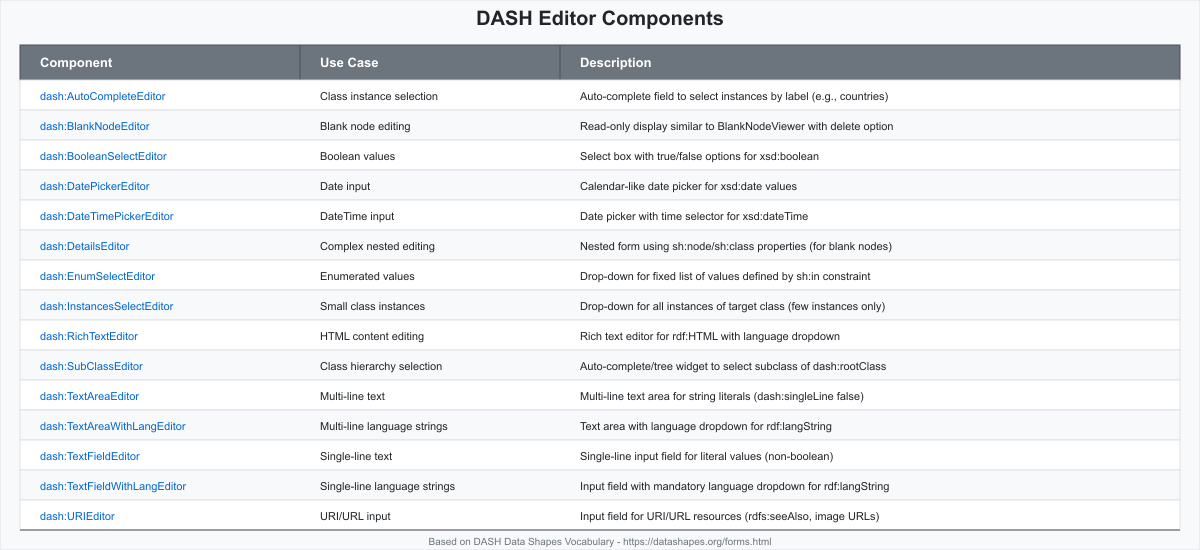
The DASH components do not do the actual rendering of the information. Rather, they serve to provide a hint to an external client about how that client can display the information. For instance, the street address shape could be enhanced with the following:
# SHACL Schema - Property Shapes
ex:Address_street_PropertyShape a sh:PropertyShape ;
    sh:path ex:street ;
    rdfs:label "Street"@en ;
    sh:name "street"^^xsd:string ;
    dash:editor dash:TextAreaEditor ;
    dash:viewer dash:LiteralViewer ;
    dash:singleLine true ;
    sh:order 1 .
Because the information for a given shape can often be inferred by an interpreter, the dash:editor and dash:viewer have a scoring schema that determines whether it is used as s default, in which case it’s not necessary to include either (a textbox, for instance, is a pretty basic control).
Similarly, if you had a property such as ex:dateMovedIn, then the presence of sh:datatype of xsd:dateTime would be sufficient to bring up a calendar control.
# SHACL Schema - Property Shapes
ex:Address_dateMovedIn_PropertyShape a sh:PropertyShape ;
    sh:path ex:dateMovedIn ;
    rdfs:label "Date Moved In"@en ;
    sh:name "dateMovedIn"^^xsd:string ;
    sh:datatype xsd:date ;
#    dash:editor dash:DatePickerEditor ; #optional for datatype of xsd:date
    sh:order 1 .
Similarly, selections from enumerations can be either specified manually with sh:in property:
ex:Address_stateOrProvince_PropertyShape a sh:PropertyShape ;
    sh:path ex:stateOrProvince ;
    rdfs:label "State or Province"@en ;
    sh:name "stateOrProvince"^^xsd:string ;
    sh:in ("AB","AL","AR","AZ","BC",...,"WA","WI","WY") ;
#    dash:editor dash:EnumSelectEditor ; #optional for sh:in
    sh:order 3 .
or can be specified by giving a class for retrieving all instances:
ex:Address_stateOrProvince_PropertyShape a sh:PropertyShape ;
    sh:path ex:stateOrProvince ;
    rdfs:label "State or Province"@en ;
    sh:name "stateOrProvince"^^xsd:string ;
    sh:class ex:StatesOrProvinces ;
    dash:editor dash:InstancesSelectEditor ;
    sh:order 3 .
Image, rich HTML, and a few other form type objects are also defined in the specification. One special feature is an Inferred Value, which is essentially a computer property shape. For instance, suppose that you wanted to determine the number of residents at a given address. This can be inferred as follows:
ex:Address_numberOfResidents_PropertyShape ;
		a sh:PropertyShape ;
                # Create the property that you wish to expose
		sh:path ex:numberOfResidents ;
                # Set its datatype
		sh:datatype xsd:integer ;
                rdfs:label "Number of Residents" ;
		sh:name "numberOfResidents" ;
                # Calculate the value
		sh:values [
			sh:count [
				sh:path [
					sh:inversePath ex:Address ;
				] ;
			] ;
		] .
This starts with the address subject and goes up the path to count the number of subjects (here ex:People) that have the same address. In effect, this instantiates as part of the form a new property that didn’t exist before, but rather was inferred based upon a path relationship. Note that sh:count is a function that is defined as part of the SHACL Advanced Features working draft, which more comprehensively establishes a SPARQL like language expressed as RDF (though it can also incorporate SPARQL directly). I hope to go into more detail about these and other upcoming features in a subsequent article.
For more information about DASH, I’d strongly recommend checking out Ontology Modeling with SHACL by Holger Knublauch, who has been instrumental in spearheading the use of DASH and SHACL in general.
This is the second in a series on SHACL and how it’s reshaping our understanding of semantics and Symbolic AI. Next, we will examine how SHACL can become an integral part of any GenAI strategy. Until then, remember that no matter where you go, there you are.
In Media Res,

Check out my LinkedIn newsletter, The Cagle Report.
If you want to shoot the breeze or have a cup of virtual coffee, I have a Calendly account at https://calendly.com/theCagleReport. I am available for consulting and full-time work as an ontologist, AI/Knowledge Graph guru, and coffee maker.
I've created a Ko-fi account for voluntary contributions, either one-time or ongoing, or you can subscribe directly to The Ontologist. If you find value in my articles, technical pieces, or general thoughts about work in the 21st century, please contribute something to keep me afloat so I can continue writing.
That is all well and handy, but XSD schema already does that, along with tools like XML CAM templates. Sadly people use UML tools that happily sort structures alphabetically, and of course ditto SQL tables may not reflect use patterns. Anyway - FYI - from CAM XML templates there is open source XSLT that will happily generate fully working Pencil wireframes, and the associated HTML forms and more.
Front-end interfaces for surfacing JSON docs also exist. Since JSON-LD is a legit serialization of RDF that might be an easier path to take for existing owl-based KGs.