
Creating a Simple Knowledge Graph (and a Pizza) with AI
Copyright 2025 Kurt Cagle / The Ontologist


Building a knowledge graph from scratch can seem like a daunting proposition, but if done right, you can put a pretty decent working ontology together in under an hour with an AI. It should be refined and tested before you put it into implementation, of course, but a big part of building knowledge graphs really come down to doing some homework before you even start.
I’ve used DeepSeek (https://chat.deepseek.com) as my AI of choice here, but you can use any GPT and get pretty much the same results. The key in all cases is to review what’s produced at every step of the way to make sure that what you’re getting really meets your needs.
#1. Identify Your Classes
Your classes represent all of the kinds of things that you want to track - the nouns of your system. Generating these kinds of lists are actually an area where GPTs shine. Here’s the prompt:
Generate a list of all of the object types that may be relevant to running a pizza shop
The response is surprisingly comprehensive:
1. Menu-Related Objects
Pizza: Base object representing a pizza, including attributes like size, crust type, toppings, and price.
Topping: Individual toppings (e.g., pepperoni, mushrooms, olives) with attributes like name, price, and availability.
Crust: Crust types (e.g., thin, thick, gluten-free) with attributes like name and price.
Side Item: Additional items like garlic bread, salads, or drinks.
Combo Meal: Predefined meal combinations with discounts.
2. Order-Related Objects
Order: Represents a customer order, including attributes like order ID, customer details, items ordered, total price, and status (e.g., pending, in-progress, delivered).
Order Item: Individual items within an order (e.g., a specific pizza or side item).
Payment: Payment details, including payment method (cash, card, online), amount, and transaction ID.
Delivery: Delivery details, including delivery address, driver, and estimated time of arrival (ETA).
3. Customer-Related Objects
Customer: Represents a customer, including attributes like name, phone number, email, and address.
Loyalty Program: Tracks customer loyalty points and rewards.
Customer Feedback: Stores feedback or reviews from customers.
4. Inventory-Related Objects
Ingredient: Tracks ingredients used in pizzas and other items (e.g., flour, cheese, sauce), including quantity and expiration date.
Supplier: Represents suppliers of ingredients, including contact details and order history.
Stock Level: Tracks the current stock levels of ingredients and other items.
Purchase Order: Orders placed with suppliers to replenish inventory.
5. Employee-Related Objects
Employee: Represents staff members, including attributes like name, role, contact information, and schedule.
Shift: Tracks employee shifts and working hours.
Payroll: Manages employee salaries, wages, and deductions.
6. Operational Objects
Table: Represents tables in the dine-in area (if applicable).
Reservation: Tracks table reservations for dine-in customers.
Kitchen Ticket: Represents orders sent to the kitchen for preparation.
Delivery Vehicle: Tracks delivery vehicles and their availability.
7. Marketing and Promotions
Promotion: Represents discounts or special offers (e.g., "Buy 1 Get 1 Free").
Coupon: Tracks coupon codes and their usage.
Advertisement: Manages marketing campaigns and advertisements.
8. Financial Objects
Invoice: Represents a bill issued to a customer.
Expense: Tracks business expenses (e.g., ingredient costs, utilities).
Revenue: Tracks income from sales.
9. Technology and System Objects
POS (Point of Sale) System: Manages transactions and order processing.
Online Ordering System: Tracks orders placed through a website or app.
User Account: Represents accounts for employees or managers to access systems.
10. Miscellaneous Objects
Recipe: Stores recipes for pizzas and other menu items.
Waste Log: Tracks food waste for inventory management.
Event: Represents special events (e.g., catering orders or pizza-making classes).
#2. Generating a SHACL File
The bulleted list contains the actual object classes, while the primary numbered lists creates an organizational type. From this, you can generate a SHACL dataset with the following prompt:
For each bulleted object type, create a SHACL sh:NodeShape object, with the name of the class (sh:name) being determined as a TitleCase derivation from the label, and sh:description being the description of this class.

For each nodeShape, include a proposed set of sh:property items, connecting them to other items in the listing via sh:path in the Pizza: namespace (http://example.com/ns/Pizza#), with each property item having the same name as the path. Generate any set of enumerations (sh:in) as distinct objects within the associated class, such as Pizza:Pepperoni in the Pizza:Ingredient class.

class and instance names should be in title case, while property names should be in camelCase. For each property shape, include a name (camelCase), a description, a nodeKind, and minCount and maxCount when relevant.
This generates a straightforward SHACL file (of which the following is a partial excerpt):
1. Pizza
Pizza:PizzaShape
    a sh:NodeShape ;
    sh:name "Pizza" ;
    sh:description "Represents a pizza, including its size, crust type, toppings, and price." ;
    sh:targetClass Pizza:Pizza ;
    sh:property [
        sh:path Pizza:size ;
        sh:name "size" ;
        sh:description "The size of the pizza (e.g., Small, Medium, Large)." ;
        sh:nodeKind sh:Literal ;
        sh:in ("Small" "Medium" "Large") ;
        sh:minCount 1 ;
        sh:maxCount 1 ;
    ], [
        sh:path Pizza:crustType ;
        sh:name "crustType" ;
        sh:description "The type of crust (e.g., Thin, Thick, Gluten-Free)." ;
        sh:nodeKind sh:Literal ;
        sh:in ("Thin" "Thick" "Gluten-Free") ;
        sh:minCount 1 ;
        sh:maxCount 1 ;
    ], [
        sh:path Pizza:toppings ;
        sh:name "toppings" ;
        sh:description "The toppings on the pizza." ;
        sh:nodeKind sh:IRI ;
        sh:class Pizza:Topping ;
        sh:minCount 0 ;
        sh:maxCount -1 ; # Unlimited
    ], [
        sh:path Pizza:price ;
        sh:name "price" ;
        sh:description "The price of the pizza." ;
        sh:nodeKind sh:Literal ;
        sh:datatype xsd:decimal ;
        sh:minCount 1 ;
        sh:maxCount 1 ;
    ] .
2. Topping
Pizza:ToppingShape
    a sh:NodeShape ;
    sh:name "Topping" ;
    sh:targetClass Pizza:Topping ;
    sh:description "Represents a pizza topping, such as pepperoni or mushrooms." ;
    sh:property [
        sh:path Pizza:name ;
        sh:name "name" ;
        sh:description "The name of the topping." ;
        sh:nodeKind sh:Literal ;
        sh:minCount 1 ;
        sh:maxCount 1 ;
    ], [
        sh:path Pizza:price ;
        sh:name "price" ;
        sh:description "The additional price for this topping." ;
        sh:nodeKind sh:Literal ;
        sh:datatype xsd:decimal ;
        sh:minCount 1 ;
        sh:maxCount 1 ;
    ], [
        sh:path Pizza:isVegetarian ;
        sh:name "isVegetarian" ;
        sh:description "Indicates whether the topping is vegetarian." ;
        sh:nodeKind sh:Literal ;
        sh:datatype xsd:boolean ;
        sh:minCount 1 ;
        sh:maxCount 1 ;
    ] .
3. Crust
Pizza:CrustShape
    a sh:NodeShape ;
    sh:name "Crust" ;
    sh:description "Represents the type of crust for a pizza." ;
    sh:targetClass Pizza:CrustType ;
    sh:property [
        sh:path Pizza:name ;
        sh:name "name" ;
        sh:description "The name of the crust type." ;
        sh:nodeKind sh:Literal ;
        sh:in ("Thin" "Thick" "Gluten-Free") ;
        sh:minCount 1 ;
        sh:maxCount 1 ;
    ], [
        sh:path Pizza:price ;
        sh:name "price" ;
        sh:description "The additional price for this crust type." ;
        sh:nodeKind sh:Literal ;
        sh:datatype xsd:decimal ;
        sh:minCount 1 ;
        sh:maxCount 1 ;
    ] .
4. Side Item
Pizza:SideItemShape
    a sh:NodeShape ;
    sh:name "SideItem" ;
    sh:targetClass Pizza:SideItem ;
    sh:description "Represents additional items like garlic bread, salads, or drinks." ;
    sh:property [
        sh:path Pizza:name ;
        sh:name "name" ;
        sh:description "The name of the side item." ;
        sh:nodeKind sh:Literal ;
        sh:in ("GarlicBread" "Salad" "Soda" "Water") ;
        sh:minCount 1 ;
        sh:maxCount 1 ;
    ], [
        sh:path Pizza:price ;
        sh:name "price" ;
        sh:description "The price of the side item." ;
        sh:nodeKind sh:Literal ;
        sh:datatype xsd:decimal ;
        sh:minCount 1 ;
        sh:maxCount 1 ;
    ] .
5. Combo Meal
Pizza:ComboMealShape
    a sh:NodeShape ;
    sh:name "ComboMeal" ;
    sh:description "Represents a predefined meal combination with discounts." ;
    sh:targetClass Pizza:ComboMeal ;
    sh:property [
        sh:path Pizza:name ;
        sh:name "name" ;
        sh:description "The name of the combo meal." ;
        sh:nodeKind sh:Literal ;
        sh:minCount 1 ;
        sh:maxCount 1 ;
    ], [
        sh:path Pizza:items ;
        sh:name "items" ;
        sh:description "The items included in the combo meal." ;
        sh:nodeKind sh:IRI ;
        sh:class Pizza:Pizza, Pizza:SideItem ;
        sh:minCount 1 ;
        sh:maxCount -1 ; # Unlimited
    ], [
        sh:path Pizza:discount ;
        sh:name "discount" ;
        sh:description "The discount applied to the combo meal." ;
        sh:nodeKind sh:Literal ;
        sh:datatype xsd:decimal ;
        sh:minCount 1 ;
        sh:maxCount 1 ;
    ] .
6. Order
Pizza:OrderShape
    a sh:NodeShape ;
    sh:name "Order" ;
    sh:description "Represents a customer order, including items, total price, and status." ;
    sh:targetClass Pizza:Order ;
    sh:property [
        sh:path Pizza:orderId ;
        sh:name "orderId" ;
        sh:description "The unique identifier for the order." ;
        sh:nodeKind sh:Literal ;
        sh:datatype xsd:string ;
        sh:minCount 1 ;
        sh:maxCount 1 ;
    ], [
        sh:path Pizza:customer ;
        sh:name "customer" ;
        sh:description "The customer who placed the order." ;
        sh:nodeKind sh:IRI ;
        sh:class Pizza:Customer ;
        sh:minCount 1 ;
        sh:maxCount 1 ;
    ], [
        sh:path Pizza:items ;
        sh:name "items" ;
        sh:description "The items included in the order." ;
        sh:nodeKind sh:IRI ;
        sh:class Pizza:Pizza, Pizza:SideItem ;
        sh:minCount 1 ;
        sh:maxCount -1 ; # Unlimited
    ], [
        sh:path Pizza:totalPrice ;
        sh:name "totalPrice" ;
        sh:description "The total price of the order." ;
        sh:nodeKind sh:Literal ;
        sh:datatype xsd:decimal ;
        sh:minCount 1 ;
        sh:maxCount 1 ;
    ], [
        sh:path Pizza:status ;
        sh:name "status" ;
        sh:description "The status of the order (e.g., Pending, InProgress, Delivered)." ;
        sh:nodeKind sh:Literal ;
        sh:in ("Pending" "InProgress" "Delivered") ;
        sh:minCount 1 ;
        sh:maxCount 1 ;
    ] .
The PizzaShape here is worth examining in more detail, as it contains several different kinds of property shapes:
Pizza:PizzaShape
    a sh:NodeShape ;
    sh:name "Pizza" ;
    sh:description "Represents a pizza, including its size, crust type, toppings, and price." ;
    sh:targetClass Pizza:Pizza ;
    sh:property [
        sh:path Pizza:size ;
        sh:name "size" ;
        sh:description "The size of the pizza (e.g., Small, Medium, Large)." ;
        sh:nodeKind sh:Literal ;
        sh:in ("Small" "Medium" "Large") ;
        sh:datatype xsd:string ;
        sh:minCount 1 ;
        sh:maxCount 1 ;
    ], [
        sh:path Pizza:crustType ;
        sh:name "crustType" ;
        sh:description "The type of crust (e.g., Thin, Thick, Gluten-Free)." ;
        sh:nodeKind sh:Literal ;
        sh:in ("Thin" "Thick" "Gluten-Free") ;
        sh:minCount 1 ;
        sh:maxCount 1 ;
    ], [
        sh:path Pizza:toppings ;
        sh:name "toppings" ;
        sh:description "The toppings on the pizza." ;
        sh:nodeKind sh:IRI ;
        sh:class Pizza:Topping ;
        sh:minCount 0 ;
        sh:maxCount -1 ; # Unlimited
    ], [
        sh:path Pizza:price ;
        sh:name "price" ;
        sh:description "The price of the pizza." ;
        sh:nodeKind sh:Literal ;
        sh:datatype xsd:decimal ;
        sh:minCount 1 ;
        sh:maxCount 1 ;
    ] .
The size of the pizza is an example of a literal property:
[
        sh:path Pizza:size ;
        sh:name "size" ;
        sh:description "The size of the pizza (e.g., Small, Medium, Large)." ;
        sh:nodeKind sh:Literal ;
        sh:datatype xsd:string ;
        sh:in ("Small" "Medium" "Large") ;
        sh:minCount 1 ;
        sh:maxCount 1 ;
    ]
This indicates that the size is specified by a literal string, with the sh:in property indicating the values that the string can take. Note that if you tie this into a formal taxonomy, you would replace the sh:datatype with a sh:class Pizza:Size, and sh:nodeKind would be set to sh:IRI:
[
        sh:path Pizza:size ;
        sh:name "size" ;
        sh:description "The size of the pizza (e.g., Small, Medium, Large)." ;
        sh:nodeKind sh:IRI ;
        sh:class Pizza:Size ;
        sh:in (Pizza:Small Pizza:Medium Pizza:Large) ;
        sh:minCount 1 ;
        sh:maxCount 1 ;
    ]
Finally, the minCount and maxCount indicate the cardinality of the property - here, with minCount = 1 and maxCount = 1, the size is required.
The toppings property is somewhat more open-ended.
[
        sh:path Pizza:toppings ;
        sh:name "toppings" ;
        sh:description "The toppings on the pizza." ;
        sh:nodeKind sh:IRI ;
        sh:class Pizza:Topping ;
        sh:minCount 0 ;
        sh:maxCount -1 ; # Unlimited
    ]
Here the minCount is 0 and maxCount is -1. The latter needs a bit of explanation. Ordinarily, if the maxCount is unbounded (can be any arbitrary number), it need not necessarily be declared. However, a lot of processes do look for that property, and the code to check for an unstated triple can get cumbersome.
Note: As was pointed out to me, the SHACL spec does not, in fact, use xs:maxCount -1 as an equivalent to “unbounded,” but, instead, omits the property in that case. It’s addition here was likely a hallucination. If you find it easier to work with a specific indicator, you need to tell the LLM to use the convention, with the caveat that this may break some inferencing.
Additionally, in this case the property include a reference to the Pizza:Topping class. SHACL deals with shapes rather than classes. However, in the Pizza:ToppingShape declaration there is a related property called sh:targetClass. This identifies the class that the shape is intended to match:
Pizza:ToppingShape
    a sh:NodeShape ;
    sh:name "Topping" ;
    sh:targetClass Pizza:Topping ; # target Class of Pizza:Topping
    sh:description "Represents a pizza topping, such as pepperoni or mushrooms." ;
    ....
This targetClass can be used in SPARQL to retrieve the corresponding shape for this property
# SPARQL
# Assume a property as input

select ?shape where {
    ?property sh:class ?class .
    ?shape sh:targetClass ?class .
    }
This might look odd - SPARQL usually tends to match object to corresponding subject, rather than object to object - but it’s just as effective. This also means that once you know an instance’s class, you can use the sh:targetClass property to retrieve its corresponding shape.
# SPARQL
# Assume an instance as input

select ?shape where {
    ?instance a ?class .
    ?shape sh:targetClass ?class .
}
This is, in fact, how SHACL performs validation of a node - each property declaration is bound into a set of SPARQL queries that follow the path from instance to class to shape, then use the values of that shape to validate the output (I’ll cover this in a subsequent article).
#3. Building a Taxonomy
The next stage in building your ontology is to identify those areas that represent long term instances, also known as taxonomy terms. In this particular case, let’s focus on the generation of a toppings list. The prompt is as follows:
For the Pizza:Topping class, generate a set of a ten instances, based on the shape captured earlier, that represent likely pizza toppings.
The output is pretty straightforward:
Pizza:Pepperoni
    a Pizza:Topping ;
    Pizza:name "Pepperoni" ;
    Pizza:price 1.50 ;
    Pizza:isVegetarian false .

Pizza:Mushrooms
    a Pizza:Topping ;
    Pizza:name "Mushrooms" ;
    Pizza:price 1.00 ;
    Pizza:isVegetarian true .

Pizza:Olives
    a Pizza:Topping ;
    Pizza:name "Olives" ;
    Pizza:price 0.75 ;
    Pizza:isVegetarian true .

Pizza:Cheese
    a Pizza:Topping ;
    Pizza:name "Cheese" ;
    Pizza:price 1.25 ;
    Pizza:isVegetarian true .

Pizza:Pineapple
    a Pizza:Topping ;
    Pizza:name "Pineapple" ;
    Pizza:price 1.00 ;
    Pizza:isVegetarian true .

Pizza:Ham
    a Pizza:Topping ;
    Pizza:name "Ham" ;
    Pizza:price 1.75 ;
    Pizza:isVegetarian false .

Pizza:BellPeppers
    a Pizza:Topping ;
    Pizza:name "Bell Peppers" ;
    Pizza:price 0.80 ;
    Pizza:isVegetarian true .

Pizza:Onions
    a Pizza:Topping ;
    Pizza:name "Onions" ;
    Pizza:price 0.60 ;
    Pizza:isVegetarian true .

Pizza:Sausage
    a Pizza:Topping ;
    Pizza:name "Sausage" ;
    Pizza:price 1.80 ;
    Pizza:isVegetarian false .

Pizza:Spinach
    a Pizza:Topping ;
    Pizza:name "Spinach" ;
    Pizza:price 0.90 ;
    Pizza:isVegetarian true .
In this case, we have the ten most common toppings, along with the per-topping price and an indication of whether the topping is vegetarian or not.
Because the AI had a SHACL shape defined for toppings, it was able to use that shape in order to generate a corresponding set of triples. This needs to be emphasized, because it gets to the core of this whole exercise. By specifying a template (the SHACL), you have given the AI instructions for creating new data based on that template.
This can, in turn, be used for reasoning. For instance, having defined the schema, we can ask the following prompt:
I'd like a pizza with sausage, mushrooms, bell peppers, and pepperoni toppings. If the base pizza without items costs $10, how much would the pizza cost?
The GPT thought for a bit, then returned this bit of analysis:
To calculate the total cost of the pizza with the specified toppings, we'll use the prices from the Pizza:Topping instances provided earlier. Here's the breakdown:
Base Pizza Cost
Base Price: $10.00
Toppings and Their Costs
Sausage: $1.80
Mushrooms: $1.00
Bell Peppers: $0.80
Pepperoni: $1.50
Calculation
Total Toppings Cost:
1.80 (Sausage)+1.00 (Mushrooms)+0.80 (Bell Peppers)+1.50 (Pepperoni)=5.101.80(Sausage)+1.00(Mushrooms)+0.80(Bell Peppers)+1.50(Pepperoni)=5.10Total Pizza Cost:
$10.00 (Base Price)+$5.10 (Toppings)=$15.10
Final Cost
The total cost of the pizza with sausage, mushrooms, bell peppers, and pepperoni toppings is $15.10.
By filling out the rest of the taxonomy (crust types, pizza sizes, side items and so forth) with relevant data, this simple ontology is able to be used for fairly sophisticated calculations … even before being put into a semantic store.
This points to another key benefit to building out such an ontology this way: each enumerated item has its own intrinsic structure of properties and relationships. This moves you away from having just a list of terms to instead having a list of objects of various types, with all the benefits that come from having that deep information.
#4. Persistance
Once the key SHACL + Taxonomy are generated, they can be persisted in a few different ways.
For relatively small knowledge graphs, you can make a request to create a comprehensive triple store based upon what had been built, persisting it as a single Turtle, JSON-LD, or RDF-XML file. Here’s the RDF-XML version of the same data:
<?xml version="1.0" encoding="UTF-8"?>
<rdf:RDF
    xmlns:rdf="http://www.w3.org/1999/02/22-rdf-syntax-ns#"
    xmlns:sh="http://www.w3.org/ns/shacl#"
    xmlns:Pizza="http://example.com/ns/Pizza#"
    xmlns:xsd="http://www.w3.org/2001/XMLSchema#">

    <!-- SHACL Shapes -->

    <!-- Pizza Shape -->
    <sh:NodeShape rdf:about="http://example.com/ns/Pizza#PizzaShape">
        <sh:name>Pizza</sh:name>
        <sh:description>Represents a pizza, including its size, crust type, toppings, and price.</sh:description>
        <sh:property>
            <sh:PropertyShape>
                <sh:path rdf:resource="http://example.com/ns/Pizza#size"/>
                <sh:name>size</sh:name>
                <sh:description>The size of the pizza (e.g., Small, Medium, Large).</sh:description>
                <sh:nodeKind rdf:resource="http://www.w3.org/ns/shacl#Literal"/>
                <sh:in rdf:parseType="Collection">
                    <rdf:li>Small</rdf:li>
                    <rdf:li>Medium</rdf:li>
                    <rdf:li>Large</rdf:li>
                </sh:in>
                <sh:minCount>1</sh:minCount>
                <sh:maxCount>1</sh:maxCount>
            </sh:PropertyShape>
        </sh:property>
        <sh:property>
            <sh:PropertyShape>
                <sh:path rdf:resource="http://example.com/ns/Pizza#crustType"/>
                <sh:name>crustType</sh:name>
                <sh:description>The type of crust (e.g., Thin, Thick, Gluten-Free).</sh:description>
                <sh:nodeKind rdf:resource="http://www.w3.org/ns/shacl#Literal"/>
                <sh:in rdf:parseType="Collection">
                    <rdf:li>Thin</rdf:li>
                    <rdf:li>Thick</rdf:li>
                    <rdf:li>Gluten-Free</rdf:li>
                </sh:in>
                <sh:minCount>1</sh:minCount>
                <sh:maxCount>1</sh:maxCount>
            </sh:PropertyShape>
        </sh:property>
        <sh:property>
            <sh:PropertyShape>
                <sh:path rdf:resource="http://example.com/ns/Pizza#toppings"/>
                <sh:name>toppings</sh:name>
                <sh:description>The toppings on the pizza.</sh:description>
                <sh:nodeKind rdf:resource="http://www.w3.org/ns/shacl#IRI"/>
                <sh:class rdf:resource="http://example.com/ns/Pizza#Topping"/>
                <sh:minCount>0</sh:minCount>
                <sh:maxCount>-1</sh:maxCount>
            </sh:PropertyShape>
        </sh:property>
        <sh:property>
            <sh:PropertyShape>
                <sh:path rdf:resource="http://example.com/ns/Pizza#price"/>
                <sh:name>price</sh:name>
                <sh:description>The price of the pizza.</sh:description>
                <sh:nodeKind rdf:resource="http://www.w3.org/ns/shacl#Literal"/>
                <sh:datatype rdf:resource="http://www.w3.org/2001/XMLSchema#decimal"/>
                <sh:minCount>1</sh:minCount>
                <sh:maxCount>1</sh:maxCount>
            </sh:PropertyShape>
        </sh:property>
    </sh:NodeShape>

    <!-- Topping Shape -->
    <sh:NodeShape rdf:about="http://example.com/ns/Pizza#ToppingShape">
        <sh:name>Topping</sh:name>
        <sh:description>Represents a pizza topping, such as pepperoni or mushrooms.</sh:description>
        <sh:property>
            <sh:PropertyShape>
                <sh:path rdf:resource="http://example.com/ns/Pizza#name"/>
                <sh:name>name</sh:name>
                <sh:description>The name of the topping.</sh:description>
                <sh:nodeKind rdf:resource="http://www.w3.org/ns/shacl#Literal"/>
                <sh:in rdf:parseType="Collection">
                    <rdf:li>Pepperoni</rdf:li>
                    <rdf:li>Mushrooms</rdf:li>
                    <rdf:li>Olives</rdf:li>
                    <rdf:li>Cheese</rdf:li>
                    <rdf:li>Pineapple</rdf:li>
                    <rdf:li>Ham</rdf:li>
                    <rdf:li>Bell Peppers</rdf:li>
                    <rdf:li>Onions</rdf:li>
                    <rdf:li>Sausage</rdf:li>
                    <rdf:li>Spinach</rdf:li>
                </sh:in>
                <sh:minCount>1</sh:minCount>
                <sh:maxCount>1</sh:maxCount>
            </sh:PropertyShape>
        </sh:property>
        <sh:property>
            <sh:PropertyShape>
                <sh:path rdf:resource="http://example.com/ns/Pizza#price"/>
                <sh:name>price</sh:name>
                <sh:description>The additional price for this topping.</sh:description>
                <sh:nodeKind rdf:resource="http://www.w3.org/ns/shacl#Literal"/>
                <sh:datatype rdf:resource="http://www.w3.org/2001/XMLSchema#decimal"/>
                <sh:minCount>1</sh:minCount>
                <sh:maxCount>1</sh:maxCount>
            </sh:PropertyShape>
        </sh:property>
        <sh:property>
            <sh:PropertyShape>
                <sh:path rdf:resource="http://example.com/ns/Pizza#isVegetarian"/>
                <sh:name>isVegetarian</sh:name>
                <sh:description>Indicates whether the topping is vegetarian.</sh:description>
                <sh:nodeKind rdf:resource="http://www.w3.org/ns/shacl#Literal"/>
                <sh:datatype rdf:resource="http://www.w3.org/2001/XMLSchema#boolean"/>
                <sh:minCount>1</sh:minCount>
                <sh:maxCount>1</sh:maxCount>
            </sh:PropertyShape>
        </sh:property>
    </sh:NodeShape>

    <!-- Topping Instances -->

    <Pizza:Topping rdf:about="http://example.com/ns/Pizza#Pepperoni">
        <Pizza:name>Pepperoni</Pizza:name>
        <Pizza:price rdf:datatype="http://www.w3.org/2001/XMLSchema#decimal">1.50</Pizza:price>
        <Pizza:isVegetarian rdf:datatype="http://www.w3.org/2001/XMLSchema#boolean">false</Pizza:isVegetarian>
    </Pizza:Topping>

    <Pizza:Topping rdf:about="http://example.com/ns/Pizza#Mushrooms">
        <Pizza:name>Mushrooms</Pizza:name>
        <Pizza:price rdf:datatype="http://www.w3.org/2001/XMLSchema#decimal">1.00</Pizza:price>
        <Pizza:isVegetarian rdf:datatype="http://www.w3.org/2001/XMLSchema#boolean">true</Pizza:isVegetarian>
    </Pizza:Topping>

    <Pizza:Topping rdf:about="http://example.com/ns/Pizza#Olives">
        <Pizza:name>Olives</Pizza:name>
        <Pizza:price rdf:datatype="http://www.w3.org/2001/XMLSchema#decimal">0.75</Pizza:price>
        <Pizza:isVegetarian rdf:datatype="http://www.w3.org/2001/XMLSchema#boolean">true</Pizza:isVegetarian>
    </Pizza:Topping>

    <Pizza:Topping rdf:about="http://example.com/ns/Pizza#Cheese">
        <Pizza:name>Cheese</Pizza:name>
        <Pizza:price rdf:datatype="http://www.w3.org/2001/XMLSchema#decimal">1.25</Pizza:price>
        <Pizza:isVegetarian rdf:datatype="http://www.w3.org/2001/XMLSchema#boolean">true</Pizza:isVegetarian>
    </Pizza:Topping>

    <Pizza:Topping rdf:about="http://example.com/ns/Pizza#Pineapple">
        <Pizza:name>Pineapple</Pizza:name>
        <Pizza:price rdf:datatype="http://www.w3.org/2001/XMLSchema#decimal">1.00</Pizza:price>
        <Pizza:isVegetarian rdf:datatype="http://www.w3.org/2001/XMLSchema#boolean">true</Pizza:isVegetarian>
    </Pizza:Topping>

    <Pizza:Topping rdf:about="http://example.com/ns/Pizza#Ham">
        <Pizza:name>Ham</Pizza:name>
        <Pizza:price rdf:datatype="http://www.w3.org/2001/XMLSchema#decimal">1.75</Pizza:price>
        <Pizza:isVegetarian rdf:datatype="http://www.w3.org/2001/XMLSchema#boolean">false</Pizza:isVegetarian>
    </Pizza:Topping>

    <Pizza:Topping rdf:about="http://example.com/ns/Pizza#BellPeppers">
        <Pizza:name>Bell Peppers</Pizza:name>
        <Pizza:price rdf:datatype="http://www.w3.org/2001/XMLSchema#decimal">0.80</Pizza:price>
        <Pizza:isVegetarian rdf:datatype="http://www.w3.org/2001/XMLSchema#boolean">true</Pizza:isVegetarian>
    </Pizza:Topping>

    <Pizza:Topping rdf:about="http://example.com/ns/Pizza#Onions">
        <Pizza:name>Onions</Pizza:name>
        <Pizza:price rdf:datatype="http://www.w3.org/2001/XMLSchema#decimal">0.60</Pizza:price>
        <Pizza:isVegetarian rdf:datatype="http://www.w3.org/2001/XMLSchema#boolean">true</Pizza:isVegetarian>
    </Pizza:Topping>

    <Pizza:Topping rdf:about="http://example.com/ns/Pizza#Sausage">
        <Pizza:name>Sausage</Pizza:name>
        <Pizza:price rdf:datatype="http://www.w3.org/2001/XMLSchema#decimal">1.80</Pizza:price>
        <Pizza:isVegetarian rdf:datatype="http://www.w3.org/2001/XMLSchema#boolean">false</Pizza:isVegetarian>
    </Pizza:Topping>

    <Pizza:Topping rdf:about="http://example.com/ns/Pizza#Spinach">
        <Pizza:name>Spinach</Pizza:name>
        <Pizza:price rdf:datatype="http://www.w3.org/2001/XMLSchema#decimal">0.90</Pizza:price>
        <Pizza:isVegetarian rdf:datatype="http://www.w3.org/2001/XMLSchema#boolean">true</Pizza:isVegetarian>
    </Pizza:Topping>

</rdf:RDF>
This output can get to be large quickly, so it is often worth outputting sections via prompts then extracting them as files that can then be composited together. In general Turtle is probably preferable to other forms here, simply because it is relatively terse (fewer namespaces floating around), but XML has a singular advantage - it is a narrative structure that works better for training LLMs than either JSON or Turtle. This also makes it more appropriate for RAG processing.
This then begs a question: can you use an LLM as a semantic graph store? The answer is a qualified yes. For instance, if you ask the following prompt:
Perform the following SPARQL Query:
select ?itemName where {
     ?s a Pizza:PizzaTopping.
     ?s Pizza:name ?itemName.
} order by ?itemName
the LLM (at least DeepSeek) should answer with something like:
Expected Results
The query will return the following results, ordered alphabetically by ?itemName:
itemName
"Bell Peppers"
"Cheese"
"Ham"
"Mushrooms"
"Olives"
"Onions"
"Pepperoni"
"Pineapple"
"Sausage"
"Spinach"
Explanation
?s a Pizza:Topping: Matches all instances of thePizza:Toppingclass.?s Pizza:name ?itemName: Retrieves thePizza:nameproperty for each topping.ORDER BY ?itemName: Sorts the results alphabetically by the?itemNamevariable.
The caveat, however, is that some LLMs do this better than others. DeepSeek r1 does pretty well with most of the queries I’ve thrown at it; Claude works reasonably well but has a small context size, ChatGPT o1 tends to be hit or miss, and I’ve not had an opportunity to test elsewhere. Context size is a more significant factor for RAG, so I recommend refreshing such soft KGs often.
As to mappings, again, for relatively small files, you can pull information from an Excel, CSV, or similar file along with the SHACL that you’ve loaded, and then instruct the LLM to map the data to RDF using the SHACL as reference. It should do with reasonably good fidelity, especially if your SHACL is well documented. I’ve used this technique several times to build taxonomies from Excel files, for instance.
#4. Visualize
One final area where LLMs and I can help is in creating diagrams. For instance, I used the following prompt to generate a mermaid diagram in my session:
Using the SHACL and corresponding data in this session, create a mermaid flowchart diagram that illustrates the data model for the pizza purchased earlier.
After a spot of tea, the LLM returned the following:
---
config:
   layout: elk
---
flowchart LR
    %% Pizza Class
    Pizza[("Pizza")]
    Pizza -->|sh:property| Size["size: Literal (Small, Medium, Large)"]
    Pizza -->|sh:property| CrustType["crustType: Literal (Thin, Thick, Gluten-Free)"]
    Pizza -->|sh:property| Toppings["toppings: IRI (Pizza:Topping)"]
    Pizza -->|sh:property| Price["price: decimal"]

    %% Topping Class
    Topping[("Topping")]
    Topping -->|sh:property| Name["name: Literal"]
    Topping -->|sh:property| ToppingPrice["price: decimal"]
    Topping -->|sh:property| IsVegetarian["isVegetarian: boolean"]

    %% Instances of Topping
    Topping --> Sausage["Sausage (name: 'Sausage', price: 1.80, isVegetarian: false)"]
    Topping --> Mushrooms["Mushrooms (name: 'Mushrooms', price: 1.00, isVegetarian: true)"]
    Topping --> BellPeppers["Bell Peppers (name: 'Bell Peppers', price: 0.80, isVegetarian: true)"]
    Topping --> Pepperoni["Pepperoni (name: 'Pepperoni', price: 1.50, isVegetarian: false)"]

    %% Pizza Instance
    Pizza -->|toppings| Sausage
    Pizza -->|toppings| Mushrooms
    Pizza -->|toppings| BellPeppers
    Pizza -->|toppings| Pepperoni
which, when passed to a Mermaid renderer, generated the following output:
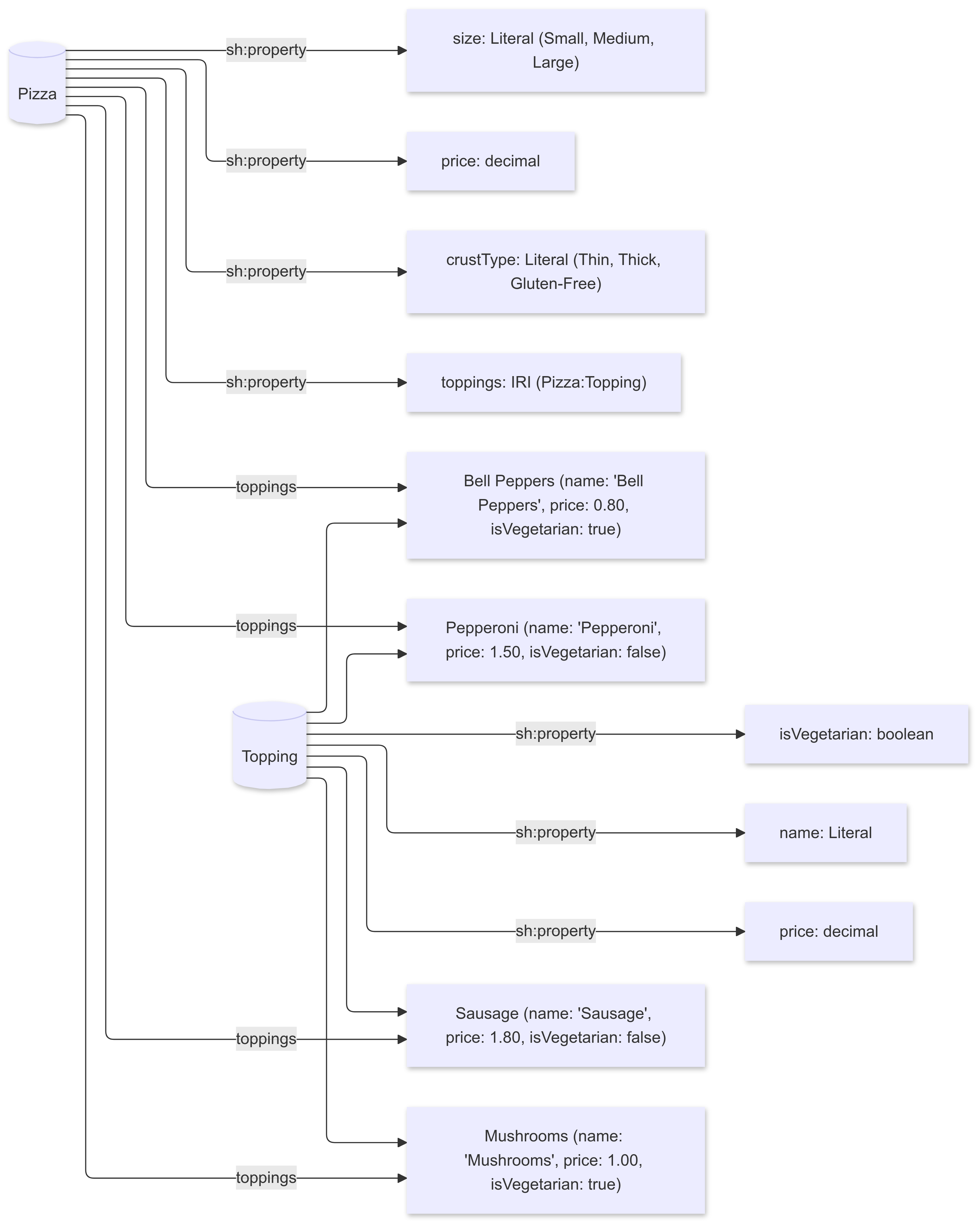
The advantage to this over a typical semantic visualizer such as Gruff is that it makes it much easier for me to control what I want to see without having to write fairly complex operational code to do the same thing. This means that as you are developing your knowledge graph, it becomes much easier to visualize how that graph works, allowing you to focus more on the model than on the coding of the visualizer.
Conclusion
After a few years of working with both LLMs and KGs, I’m still not convinced that an LLM can act as a broad-scale knowledge graph out of the box (there are still some big unresolved issues about the limitation of latent spaces and the mapping of narrative to conceptual models, for instance). However, as a tool for building knowledge graphs, an LLM can dramatically reduce both the complexity of constructing a knowledge graph and make it easier to test and visualize what that knowledge graph is capable of.
This is good, for a number of reasons. Knowledge graphs can be very complex and sprawling, and managing such graphs becomes more challenging by the day. Moreover, knowledge graphs (and ontologies) are increasingly forming the backbone of LLMs, providing structure and consistency that vector stores and LLMs as they are constituted now sorely lack. The models are not quite the same; I have an article in the work that talks about the differences between grammatical and conceptual models, one that I hope should spur some much needed discussion, but a I see it, any tool that can make building knowledge graphs easier can only be beneficial.
In media res,

Check out my LinkedIn newsletter, The Cagle Report.
If you want to shoot the breeze or have a cup of virtual coffee, I have a Calendly account at https://calendly.com/theCagleReport. I am available for consulting and full-time work as an ontologist, AI/Knowledge Graph guru, and coffee maker.
I've created a Ko-fi account for voluntary contributions, either one-time or ongoing, or you can subscribe directly to The Ontologist. If you find value in my articles, technical pieces, or general thoughts about work in the 21st century, please contribute something to keep me afloat so I can continue writing.
A very practical guide with an example many can relate to. Thanks!
Kurt, why did you decide to use SHACL? Would this work if you just had a knowledge graph in a ttl file or already in rdf triples?